Many people with an idevice use it normally. However, there are some who jailbreak it. Although I have decided not to this to my iPhone, I did do it to my iPod Touch. Jailbreaking has been deemed a way to void your warranty if done to your device. Yet, restoring your device will restore your warrant if you are still within your warranty period.
Anyway, many who jailbreak their idevice found a slight problem earlier this. Upon opening up the iBooks application, they found they could not read their purchased books. It turns out that Apple had left a verification script in there that was actually false. When I say false, it is designed to be rejected by iOS. However, the jailbreak went so far that it passed. Having passed, the script triggered a safety measure within the application. This made the application not allow users to read their books.
Although this temporarily stunned most users, it was quickly fixed by the jailbreaking community. Everything has returned to normal, and people can return to using their device without a problem. As a note, I would like to say that this article in no ways is telling you to jailbreak your device. It is simply a news tid bit.
~Dave
Showing posts with label Jailbreaking. Show all posts
Thursday, February 17, 2011
Apple Tried to Crack Down
Wednesday, January 5, 2011
Skype Video Calling
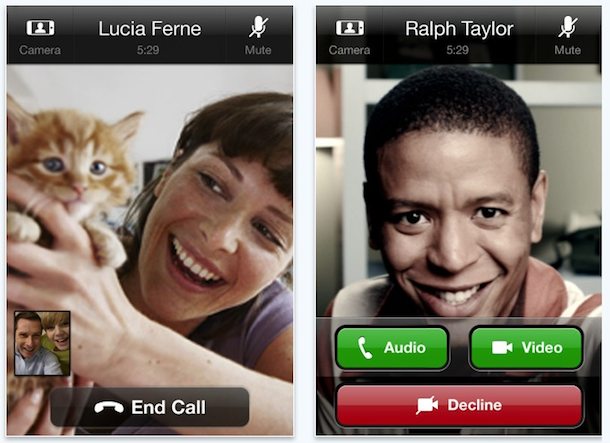
Skype for the iPhone has put out its latest update, and this one competes with Facetime. The new update allows iPhone to iPhone video calling, as well as iPhone to Desktop video calling. Not only that, but you have the ability to use 3G OR WiFi. This is a quite a push from Skype to show they are still in the game. They have the upper hand at the moment because you can't use Facetime over WiFi. That is, as long as you don't jailbreak. Anyway, from some footage I saw of people testing it, there was a common trend of Skype managing the video transmission better. By no means will a person using a desktop computer see the call from the phone crystal clear because Skype manages bandwidth by degrading the picture a little. However, the person on the phone will see much better because it is coming from a desktop computer. Facetime however, is more grainy, and videos that I watched showed Facetime constantly adjusting the quality. In my opinion, unless Apple is able to let Facetime users use WiFi out of the box, and improve the quality, may people will switch to the Skype application. It will be interesting to see if Google jumps on the video calling wagon in the future.
~Dave
Friday, September 3, 2010
Jailbreaking Your "i"Device?
Something that has been all around the news lately is the talk of jailbreaking, especially when it pertains to Apple's "i"devices such as the iPod Touch, iPad, or iPhone. Should you jailbreak? The bottom line, it is really up to you. However, jailbreaking does give you a wide assortment of apps that would not be given to you through the app store. I won't go into discussion on how to jailbreak here, you can find how to do that in other places such as iPodTouchFans. I have a 1G (1st generation) iPod Touch and I have jailbroken mine. One of the major reasons being multi-tasking. Since iOS 4 is not coming to my iPod, I used jailbreaking to give me the ability to do things that would not normally be possible. Plus, you can theme your "i"device to make it aesthetically pleasing. Even folders, found in the iOS, have been on jailbroken devices for almost two years now. Jailbreaking is one of those things that can be easy to use, but hard to master. Over time, you will learn more about it if you decide to jailbreak. If not, enjoy your "i"device.
Post a picture of your jailbroken screen if you have one!
~Dave
Post a picture of your jailbroken screen if you have one!
~Dave
Wednesday, September 1, 2010
Gotta Catch 'em All.... on your iDevice!
Recently, a friend of mine approached me and asked how could he play Pokemon Emerald on his jailbroken iPhone. I told him that he needed to download the application "GPSphone" from Cydia. So he tried it and found that he needed ROMs. I can't tell you where to get Roms, but I can tell you to google it. Anyway, he wanted Roms so he googled for it and found a Cydia repo that hosted roms. It took him a while to download them, but when he launched it the app crashed. This happened every time that he launched the games. He contacted me again and asked me what was wrong. So I started searching. What I found was really interesting. Anyone who used the applications "Blackra1n" to jailbreak would have a kernel that was patched correctly, while if you used Pwnage Tool you would have an incorrectly patched kernel, hence the reason the app was crashing. I told him to run "BlackRa1n" on his iPhone to fix the kernel, and it worked for him. He can now play all the pokemon games he wants. When I tried it on my iPod however, I found that "Blackra1n" only works up to version 3.1.2, not 3.1.3. So I downgraded and rejailbroke. I downloaded GPSphone, but unlike my friend, I used SSH (Secure Shell) to manually add the games to my iPod. I used an application name "Cyberduck" for Mac, there is also WinSCP if you use windows. Once I logged into my iPod I navigated to
~Dave
/private/var/mobile/ROMS/GBA and dropped my games in there. I started it up and now I can play my GBA games when ever I want. This can also be done on the iOS devices, but how it is done I am not sure because I don't own an iOS device. If you would like an article on how to do it on an iOS device, email me or send me a tweet and I will get right on it!~Dave
Subscribe to:
Posts (Atom)